For private coaches and trainers
A coaching site that runs the sign-ups, the waitlist and the asking for money
If you coach on your own, the coaching is the easy part. The rest is a text thread per family: which rink on Thursday, is there still room in the camp, what do I owe you, can you send the drills again. leaguify gives a coach one site that answers all of those, and a portal behind it where a session is set up once and the follow-up happens by itself.
It works for any coach who sells sessions: skating and skills, goaltending, pitching and hitting, strength and conditioning. We built it first with hockey skills coaches, which is why the examples on this page are about ice time.
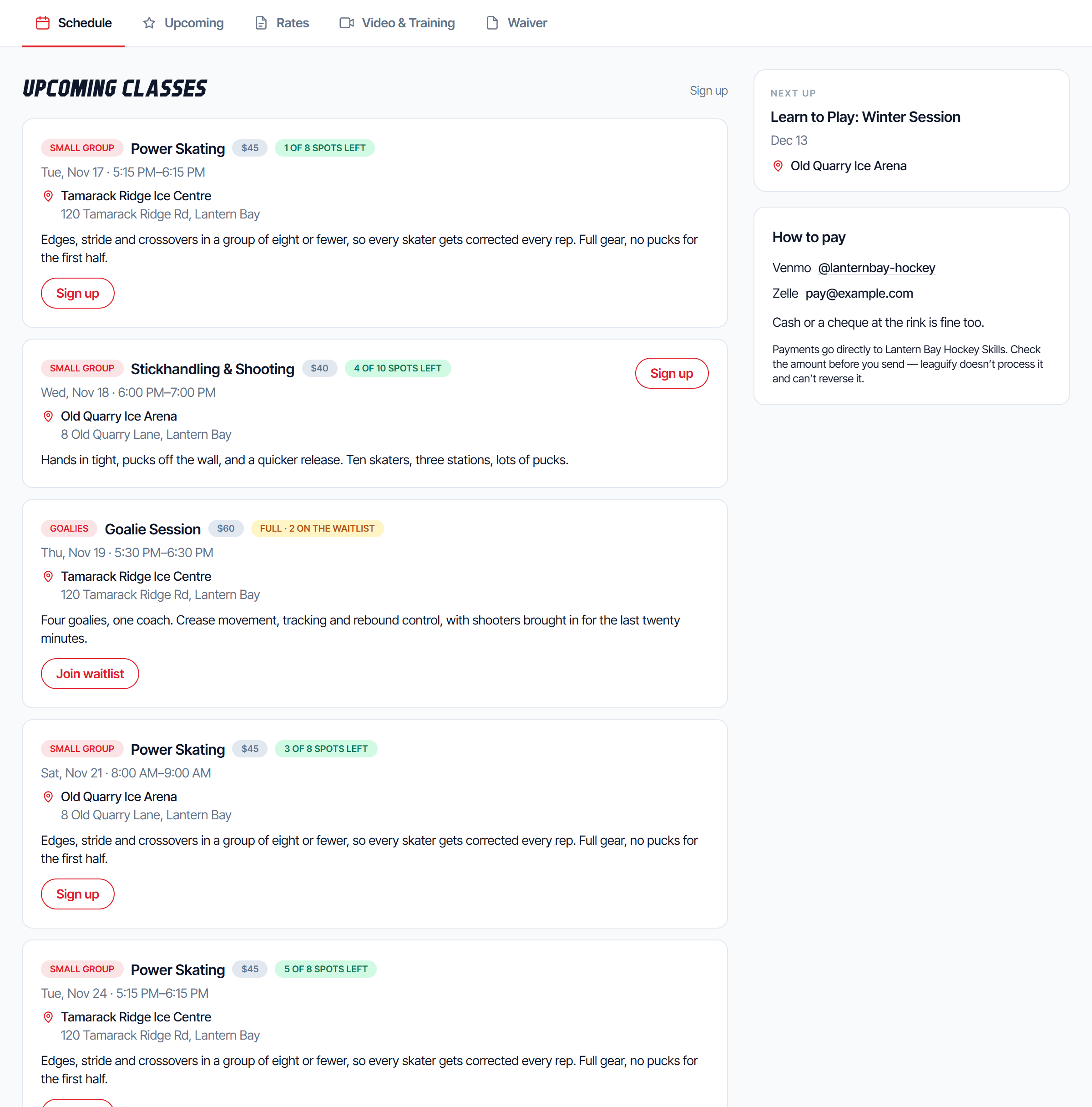
A schedule families book from, with the rink on every entry
Your week sits on one calendar: small-group sessions, goalie nights, private lessons, and every day of every camp. A parent taps a session and sees the time, the price and the place. The place gets a line of its own with a pin beside it, and tapping it opens directions, so nobody drives to the wrong sheet of ice because the venue was buried at the end of a sentence.
You type a venue once. The next time you schedule a session, the places you have used are offered back with their addresses already filled in.
A player limit on every session, and a waitlist families can see the length of
Set how many players a session takes. The page counts down the spots as families sign up, and when the last one goes it says so and starts a waitlist. A parent deciding whether to join sees how many are already waiting, which is the number they actually need. They never see who: names on the list stay in your portal.
In the portal the waitlist is numbered in the order people joined it. When a spot opens, or you decide you can take a ninth skater, one button moves a family in. Promotion is always your decision, never something the site does behind your back.
Camps and clinics, posted weeks ahead
A camp is not a weekly session, so it is not posted like one. Give it a title, its days, a description, a flyer if you have one, and its rates: the full camp, an early-bird price, a single morning. Each camp gets the button that suits it. Families can sign up on your site against a limit, follow a link to the rink’s own registration page when the rink runs it, or message you when it is something you arrange one family at a time.
Every day of a camp also appears on your schedule, marked as day two of three, so a parent looking at next month sees the whole picture in one place.
Finalize: confirm everyone and ask for payment in one press
This is the part coaches tell us they dread. The session is full, and now somebody has to tell eight families they are in, tell them what they owe, and keep track of who has paid. Press Finalize on a session or a camp and you get one screen to check: who is signed up, the price each will be asked for, and the total. You can change one family’s amount for a sibling discount, or confirm everyone without asking for money at all.
Press send and each family gets one email: they are confirmed, when and where, the amount, and how to pay you, by Venmo, Zelle or cash at the rink. Replies come to you. From then on the session shows how many have paid, and your invoice list filters down to that one camp when you want to see who has not.
Somebody who signs up after you have finalized is added to the same bill. Their confirmation waits for you to send it, with a count beside the session, so the site never emails a stranger on its own say-so.
Training to do at home, in the form you already have it
The work between sessions is where players improve, and most coaches already hand it out somehow: a typed list of reps, a one-page PDF for the garage wall, a link to a video. Post any of the three, or all three together as one piece of training. The written part appears on the page exactly as you typed it, the video plays beside it, and the PDF opens with a tap.
File training in folders next to your drill videos, by week or by skill, so a family looking for this week’s stickhandling routine finds the clip and the routine together.
Rates families can read without asking
Each program lists its own prices: a single session, a five-pack, a private lesson. Each camp lists its own. They appear with the session wherever it shows, so the question of what a Thursday costs is answered on the Thursday. You choose whether your payment details appear on the public page or only on the bills you send.
A waiver signed on the page, before the first session
Paste in your waiver and families read and sign it on your site, with the participant’s name and the date kept for you. The sign-up confirmation points anyone who has not signed toward it, so you are not standing at the boards with a clipboard while the ice time runs.
One price for the whole coaching business
A coaching site is $12 a month after a 30-day free trial, or $68 paid once for twelve months with nothing renewing by itself. Every family who books with you is included; there is no charge per sign-up and no cut of what you are paid.
Or see a live coaching site first.